
Spatial Touch - Air Gestures
Contains adsIn-app purchases

star
20.4K reviewsinfo

Parental guidance
info
10M+
Downloads


About this app
Over 20 million downloads worldwide!
Spatial Touch makes it easy to control your phone without touching the screen. Use simple hand gestures to navigate apps, create custom actions for things you do often, and automate repetitive taps and swipes. You can also access your favorite actions through floating buttons and customizable on-screen controls.
WHAT YOU CAN DO
HANDS-FREE GESTURE CONTROL
When touching your screen isn't easy, use hand gestures to scroll, tap, swipe, and navigate your phone. Enjoy hands-free control while watching videos, browsing social media, playing games, or using your favorite apps.
20 GESTURES & HAND SIGNS
Choose from 20 gestures and hand signs, and decide what each one does. Customize your controls to fit the way you use your phone.
AIR MOUSE
Turn your hand into a mouse. Move the on-screen pointer and interact with your phone using hand gestures.
CREATE CUSTOM ACTIONS
Record taps, swipes, long presses, or a sequence of multiple steps. Save them as custom actions and run them with hand gestures or on-screen buttons.
AUTO CLICKER & REPEAT ACTIONS
Let Auto Clicker handle repetitive taps, swipes, and other recorded actions. Set how many times an action repeats, choose a duration, or let it run continuously. You can also adjust the delay between repetitions.
MULTIPLE MACROS FOR EACH APP
Create as many custom actions (macros) as you want for each app. Your macros are automatically ready whenever you open those apps, so there's no need to manually load presets or reposition touch points.
QUICK ACTIONS & FLOATING BUTTONS
Keep your most-used actions within easy reach. Add floating buttons to run them with a single tap, and choose which buttons appear in each app.
VIRTUAL REMOTE
Build a personalized on-screen remote for each app. Add buttons for playback, volume, scrolling, custom actions, or anything else you've set up. Arrange the controls to suit how you use each app, with your favorite functions just a tap away.
MADE FOR EVERYDAY MOMENTS
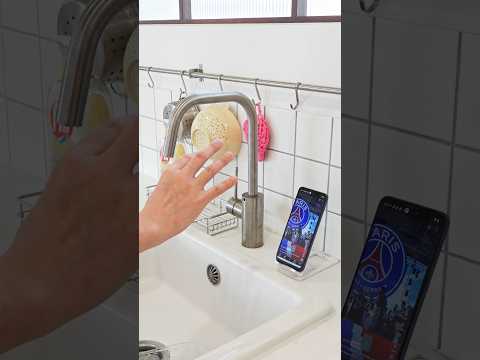
Watching videos in bed, cooking with wet hands, working out, or eating? Spatial Touch lets you stay in control without constantly reaching for your phone. Whether your hands are busy or you simply want a more convenient way to interact, hands-free gestures make everyday tasks easier.
ON-DEVICE AI & PRIVACY
Spatial Touch uses on-device AI to recognize your hand gestures directly on your phone. Camera images are processed locally, without being uploaded to external servers or stored by Spatial Touch.
PERMISSIONS
Camera (Required): Used to recognize hand gestures. The camera is activated only when gesture recognition is needed.
Notifications (Required): Used to display service status and notifications.
Accessibility (Optional): Uses the Accessibility Service API to perform screen interactions and control third-party apps through hand gestures and custom actions. Some features remain available without this permission.
NEED HELP?
Questions, feedback, or feature requests? Contact android@reehee.io.
Spatial Touch makes it easy to control your phone without touching the screen. Use simple hand gestures to navigate apps, create custom actions for things you do often, and automate repetitive taps and swipes. You can also access your favorite actions through floating buttons and customizable on-screen controls.
WHAT YOU CAN DO
HANDS-FREE GESTURE CONTROL
When touching your screen isn't easy, use hand gestures to scroll, tap, swipe, and navigate your phone. Enjoy hands-free control while watching videos, browsing social media, playing games, or using your favorite apps.
20 GESTURES & HAND SIGNS
Choose from 20 gestures and hand signs, and decide what each one does. Customize your controls to fit the way you use your phone.
AIR MOUSE
Turn your hand into a mouse. Move the on-screen pointer and interact with your phone using hand gestures.
CREATE CUSTOM ACTIONS
Record taps, swipes, long presses, or a sequence of multiple steps. Save them as custom actions and run them with hand gestures or on-screen buttons.
AUTO CLICKER & REPEAT ACTIONS
Let Auto Clicker handle repetitive taps, swipes, and other recorded actions. Set how many times an action repeats, choose a duration, or let it run continuously. You can also adjust the delay between repetitions.
MULTIPLE MACROS FOR EACH APP
Create as many custom actions (macros) as you want for each app. Your macros are automatically ready whenever you open those apps, so there's no need to manually load presets or reposition touch points.
QUICK ACTIONS & FLOATING BUTTONS
Keep your most-used actions within easy reach. Add floating buttons to run them with a single tap, and choose which buttons appear in each app.
VIRTUAL REMOTE
Build a personalized on-screen remote for each app. Add buttons for playback, volume, scrolling, custom actions, or anything else you've set up. Arrange the controls to suit how you use each app, with your favorite functions just a tap away.
MADE FOR EVERYDAY MOMENTS
Watching videos in bed, cooking with wet hands, working out, or eating? Spatial Touch lets you stay in control without constantly reaching for your phone. Whether your hands are busy or you simply want a more convenient way to interact, hands-free gestures make everyday tasks easier.
ON-DEVICE AI & PRIVACY
Spatial Touch uses on-device AI to recognize your hand gestures directly on your phone. Camera images are processed locally, without being uploaded to external servers or stored by Spatial Touch.
PERMISSIONS
Camera (Required): Used to recognize hand gestures. The camera is activated only when gesture recognition is needed.
Notifications (Required): Used to display service status and notifications.
Accessibility (Optional): Uses the Accessibility Service API to perform screen interactions and control third-party apps through hand gestures and custom actions. Some features remain available without this permission.
NEED HELP?
Questions, feedback, or feature requests? Contact android@reehee.io.
Hands busy? Control your phone with air gestures and automate repetitive tasks.
Updated on
Safety starts with understanding how developers collect and share your data. Data privacy and security practices may vary based on your use, region, and age. The developer provided this information and may update it over time.


Ratings and reviews
20.1K reviews

Melanie Soriano
- Flag inappropriate
October 1, 2026
DO NOT INSTALL so i thought this was a air gester app that actually works but when i launched youtube it didn't even work even though when i tried to raise my volume it also didn't work so please do not install if you do not want your storage to be full
46 people found this review helpful

Dav
- Flag inappropriate
October 4, 2026
horrible I would rate this zero Stars if I can but it just kept glitching I had to touch the screen to get out of the app so I could stop the glitching oh and also it didn't even work I had to touch the screen to scroll on YouTube
3 people found this review helpful

آوینا درخشان
- Flag inappropriate
July 7, 2026
Look, I tried it, it really works and it's good, but there's a problem: the camera is down there and it's right in front of the keyboard and captions, so you can't move it and type comfortably.
17 people found this review helpful
Reehee Company, Inc.
July 8, 2026
Thanks for your feedback and we're sorry about this. There's a bug where the camera view is on, the indicator doesn't disappear even no hand is detected. We're fixing it and it will be resolved in the coming updates. For now, please go to Gesture Tab - Indicator Settings and disable Camera View. The indicator will only appear when hand is detected.
What’s new
Custom Action Recording for Free Users – Now available to all users!
Improved Gesture Stability – Enhanced reliability of Pinch and Hand Sign gestures.
4 New Hand Sign Gestures – Three, Four, Thumb Right, and Thumb Left.
Improved Action Recording – Enhanced stability throughout the recording process.
New Actions Mode in Control Panel – View, edit, and execute recorded actions directly from the panel.
Floating Action Buttons – Create floating buttons for quick access to your custom actions.
Improved Gesture Stability – Enhanced reliability of Pinch and Hand Sign gestures.
4 New Hand Sign Gestures – Three, Four, Thumb Right, and Thumb Left.
Improved Action Recording – Enhanced stability throughout the recording process.
New Actions Mode in Control Panel – View, edit, and execute recorded actions directly from the panel.
Floating Action Buttons – Create floating buttons for quick access to your custom actions.
App support
About the developer
주식회사 리희컴퍼니
nathan@reehee.io
대한민국 서울특별시 마포구
마포구 양화로 136, 407호(서교동, 코너빌딩)
04038
+82 10-3759-2081


