

PEGI 3
Learn more


About this app
***** “What does it do? Everything… quickly and easily. It’s really awesome!“ – Life In LoFi
***** “For the features and performance delivered, the app is a must have for all iOS device users who enjoying photo editing.” – ePHOTOzine
Welcome to creative photo editing!
Handy Photo was designed for those with a strong passion for photo editing. The app is a perfect choice when it comes to correcting and enhancing photos from all possible angles.
* Making tonal and color adjustments globally and locally *
Improve the general look of your photos by performing both global and local tonal and color corrections in them. With a few taps and swipes only, turn your images into vivid and vibrant works of art.
* Retouching photos with ultimate ease *
Remove unwanted content from your photos in a tap. Mobile image retouching has never been so fast and easy.
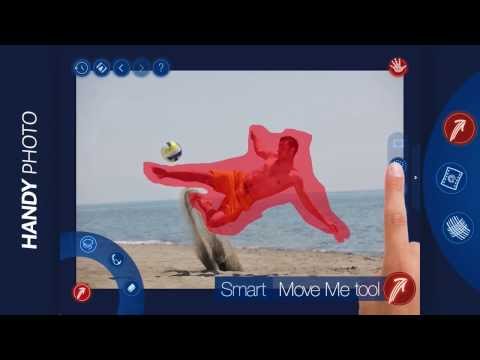
* Moving objects from photo to photo *
Is it possible to move any object within a single photo or to another image in just a few taps? The answer is yes when it comes to the Move Me tool. With it, you can do the impossible – move objects in photos to the locations they would never move to in real life.
* Applying filters to images partially *
With the Handy Photo’s powerful photo filters, which include Black and White, Bleach Bypass, Color Standout, Cross Process, Dramatic, Duotone, Fog, Glow, Golden, HDR, Halftone, Ink, Lomo, Old Photo, Polarization, Polaroid, Sepia, Sketch, Smart Contrast, Tilt-Shift, Tiny Planet, Vignette, and Vintage, you can add whatever artistic effects wanted to your images. The filters are all adjustable and, thanks to the partial application feature, can be easily combined within photos.
* Adding textures to photos partially *
Apply the Handy Photo’s terrific textures to your images to make them truly pop. You can select from the following categories of textures: Abstract, Cloth, Clouds, Frost and Ice, Grunge, Paper, Water, and Wood. All the textures can be adjusted to taste and applied to photos partially.
* Uncropping photos in a unique way *
The tool is called Magic not accidentally. It allows uniquely uncropping photos. No other app can do that. Moreover, it allows straightening crooked horizon lines in photos without sacrificing their original size.
* Adding attention-grabbing frames to images *
Before showing your photo to the whole world, it’s quite important to appropriately frame it. The Handy Photo’s excellent collection of frames serves just that purpose. Put the final touches on your photos by adding the following frames to them: Autumn Leaves, Carton, Film, Glass, Grunge, Lace, Paint Splashes, Pencil Sketch, Photo Album, Polaroid, Retro Photo, Sea Shell, Torn Paper, and Vintage.
* THE APP FEATURES *
★ Global and local tone and color correction options
★ Partial application option in Filters tool
★ Advanced retouching technology for mobile platforms
★ Move Me technology for smart objects extraction and moving
★ Magic Crop tool with unique photo “un-cropping” function
★ High-quality textures and frames
★ 100% size image editing
★ Up to 36 MP image support
★ RAW format support
★ Optimized for multi-core and GPU processors
★ Stylish and intuitive UI
Brought to you by the developers of TouchRetouch! :)
* DEVICES SUPPORT *
All devices running Android 2.3 or newer and supporting ARMv7.
Depending on the amount of total RAM available, the following resolution images processing is allowed:
2 GB of RAM - 24 MP
1 GB of RAM - 16 MP
786 Mb of RAM - 12 MP
512 Mb of RAM - 8 MP
less than 512 MP of RAM – 5 MP
* WEBSITE *
http://adva-soft.com/products/handy-photo/
Download Handy Photo right now and enjoy unlimited photo editing freedom!
Handy Photo editing on the go
Updated on
Safety starts with understanding how developers collect and share your data. Data privacy and security practices may vary based on your use, region, and age. The developer provided this information and may update it over time.
- No data shared with third partiesLearn more about how developers declare sharing
- No data collectedLearn more about how developers declare collection


Ratings and reviews
3.77K reviews

David J. Curtis
- Flag inappropriate
October 4, 2024
4TH phone I've installed it on. I'd rate it a 6. Worth way more than the price. I overlooked it several times in the market. Truly a must have for anyone serious about portable photo-graphics power. 1 request: a way to set the save path to the removable SD Card storage space.
162 people found this review helpful

Mr Pink
- Flag inappropriate
December 1, 2022
Really like this app, had it since 2017 but now I have to verify just about weekly which is getting on my nerves, once is enough but I'll bet I've surpassed 50+ times already, enough!!!! And it seems I can no longer store optional textures/frames/ect anymore. Feels like an American managed app now, inferior to what it used to be. But as far as it's options, it offers some cool editing tools, but not what it used to be.
4 people found this review helpful

KRONIS HAMMA
- Flag inappropriate
May 9, 2021
GREATLY DISAPPOINTED!!! This app has been a constant tool in my phone for some years... For some reason this app is now hugely problematic... I have deleted this app so many times... When added to my phone a huge number of past deleted photos suddenly appear in my gallery, many of which appear on facebook when I look for images to upload & show an incompatible notification, so I have to go into my gallery & continually delete up to 130 previously deleted images that continue to reappear???
4 people found this review helpful
What’s new
• Added support for ARM64 so that you could enjoy faster image loading and algorithm processing.
• Fixed an issue that would make the app quit when sending a photo from Google Photos to Handy Photo through the “Edit in” option.
• Made minor fixes and improvements.
• Fixed an issue that would make the app quit when sending a photo from Google Photos to Handy Photo through the “Edit in” option.
• Made minor fixes and improvements.
PEGI 3
Learn moreApp support
About the developer
ADVA Soft GmbH
company@adva-soft.com
Scherenbergstr. 8
10439 Berlin
Germany
+49 176 23808091


